Linux Journey: More Tests and choosing a distro
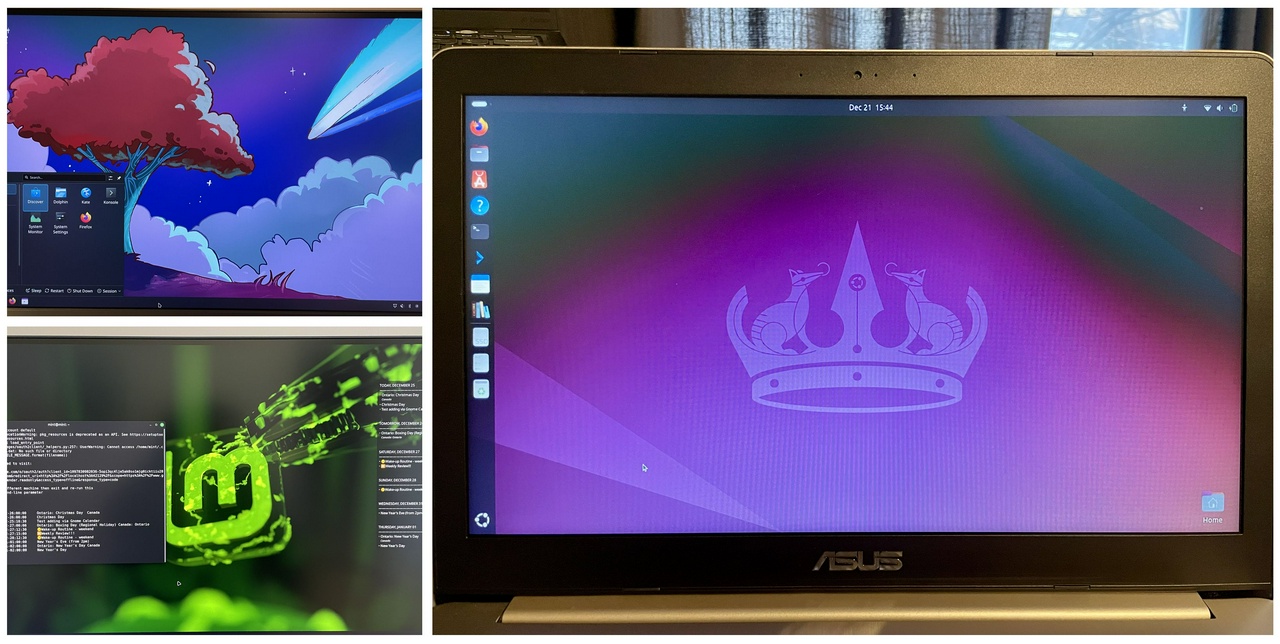
I have been using Linux on my older ASUS laptop for roughly four days now, and I didn’t even need to open Windows for anything. I tested three distros in the meantime, but I mostly used Ubuntu 25.10 to perform tests on all the activities I normally do on Windows, to see if I could make them work.
✅ Things that are working now:
- Dropbox: I installed Dropbox, and now it works, it’s syncing locally, which I like. But the Dropbox pricing is kinda expensive (min plan is 2TB) and I read some issues they had with privacy, so that is a bit concerning to me, since privacy is one of the reasons I'm switching to Linux.
- OneDrive: actually, I added the Microsoft 365 to the Online Accounts option in Settings, and it just worked! I can access all the OneDrive files virtually. I want to use this as a transition space until I'm totally switched to another cloud service. This only worked properly with Ubuntu 25.10.
- pCloud app: I installed the pCloud app and it worked! Everything is syncing! I really like this service. I am thinking of getting the 500Gb plan to test out and transfer my entire OneDrive to pCloud. It syncs superfast, and I can access everything on the web and on my phone. There’s also an option to sync files locally, which I tested. It’s cheaper than Dropbox, and they even offer lifetime plans. Also, super easy to use and set-up on Linux.
- Thunderbird: Email syncing with Outlook worked well, no issues there. I had a hard time syncing the calendar, though. I had to install plugins (TbSync & Provider for Exchange/Office 365 add-ons for automatic syncing). At first, the syncing produced a bunch of errors. I removed and re-added the account, waited a bit longer, and then it finally started syncing. Now all the calendars I selected are synced. I’m not sure if the syncing errors will happen again, so this is something to monitor. This setup is also a workaround until I switch to another calendar service.
- I also tried the GNOME calendar, which looks great, I love it! But I couldn't get the Outlook Calendar to show up in there. Google Calendar syncs instantly after adding Google via the Online Accounts settings. Interesting how much easier it is to sync compared to Outlook.
- I connected the Kobo to Ubuntu via USB. It was recognized, it charges and connects to Calibre, no problem.
- Bluetooth speakers: my JBL speakers work perfectly!!
- Firefox: Installed an extension on Firefox to create PWA apps from the web.
- Calibre/e-Book/DRM: I tried a bunch of stuff, including suggestions from readers of my blog (thank you so much!🤗). What ultimately worked was installing WINE and emulating Adobe Digital Editions along with the de-DRM app on Linux. So I did it! It’s the same process I use on Windows. But I found out how that the DRM plugin on Calibre works, and it can remove DRM from any book when I connect my Kobo to the computer, so that’s cool! I can de-DRM books that I purchased on Kobo, which I was never able to do before.
- Nautilus: The file explorer Nautilus annoyed me quite a lot, and the customization options are not great. But I found an alternative: Nemo. Installing it with
sudo apt install nemogives me just what I need (like resizing the sidebar). - Keyboard shortcuts: I learned how to make a custom keyboard shortcut to open new Nautilus/Nemo windows! I am still learning the usual keyboard shortcuts.
💿 Some distros I tried out
- Kubuntu 25.10: it's so cute! I love how it looks! However, the Online Accounts option was not there at all! So I couldn't find a way to connect to OneDrive or Google. That makes it kind of useless for me right now during this transition period, though it might be an option in the future.
- Linux Mint 22.3 (beta): nice and looks great, lots of customization options. But I also couldn't connect to Microsoft (there is an error when it goes to the login page, the webpage to authenticate shows that it's an unauthorized service from Microsoft).
- Ubuntu 24.04.3 LTS: I went back to my first install in the HDD, and for some reason the Microsoft account connected only works for the calendar, but not for the files. Weird. I think Ubuntu 25.10 is the best option for me right now.
- I’ve heard about Zoran OS and Bazzite, but didn't try them. They seem to be kinda similar at first glance, and I think I still prefer Ubuntu for now. I don’t want to spend a lot of time distro-hopping, because that will lead me into decision paralysis.
- 🎯 CONCLUSION: I will start with Ubuntu 25.10. This version gave me all the options and functionalities I needed to get started. And I got used to the GNOME interface surprisingly quickly. I began appreciating the somewhat minimalistic vibes.
📌Some Videos that I watched about choosing a distro:
- Choosing Your First Linux Distro by ExplainingComputers
- How to Choose the Right Linux Distribution | Best Linux for Beginners Explained by tektoc
- Linux Mint 22.3 | Close Look at the Cinnamon Menu 6.6 by Switched to Linux
- Linux Mint vs Ubuntu: Which Is Better for You? by PulsarTECH
⏭️ Next Steps
- I’m doing a full backup of my OneDrive files to my external SSD.
- Other files I want to back up: My Steam library game saves (I’m not sure all saves are stored online) and my Calibre Library (I will export a backup file).
- Do a final installation of Ubuntu 25.10 on my main laptop (ThinkPad X1 Carbon) and test all the hardware and functionalities to start using it as my daily driver for personal use.
- Figure out what I want to do about the online/cloud services I use: cloud storage, digital calendar, emails.
Thoughts? Discuss... if you have a Write.as account or Reply by email
By Noisy Deadlines Minimalist in progress, nerdy, introvert, skeptic. I don't leave without my e-reader.